 6a03a0b9d1
arXiv frequently returns 503 to default Python urllib clients. Set a real User-Agent header and retry on 429/5xx with exponential backoff. Co-Authored-By: Claude Opus 4.6 (1M context) <noreply@anthropic.com> |
||
|---|---|---|
| .. | ||
| data | ||
| img | ||
| build.py | ||
| cache_model.py | ||
| clean_eml.py | ||
| fetch_arxiv.py | ||
| query.py | ||
| README.md | ||
| requirements.txt | ||
Large Language Models Part III: Retrieval-Augmented Generation
CHEG 667-013 — Chemical Engineering with Computers
Department of Chemical and Biomolecular Engineering, University of Delaware
Key idea
Build a local, privacy-preserving RAG system that answers questions about your own documents.
Key goals
- Understand the RAG workflow: chunk, embed, store, retrieve, generate
- Build a vector store from a document collection
- Query the vector store and generate responses with a local LLM
- Experiment with parameters that affect retrieval quality
In Parts I and II, we trained a small GPT from scratch and then ran pre-trained models locally with ollama. We even used ollama on the command line to summarize documents. But what if we want to ask questions about a specific collection of documents — our own notes, emails, papers, or lab reports — rather than relying on what the model was trained on?
This is the idea behind Retrieval-Augmented Generation (RAG). Instead of hoping the LLM "knows" the answer, we:
- Chunk our documents into short text segments
- Embed each chunk into a vector (a list of numbers that captures its meaning)
- Store the vectors in a searchable index
- At query time, embed the user's question the same way
- Retrieve the most similar chunks using cosine similarity
- Generate a response by passing those chunks to an LLM as context
The LLM never sees your full document collection — only the most relevant pieces. Everything runs locally. No data leaves your machine.
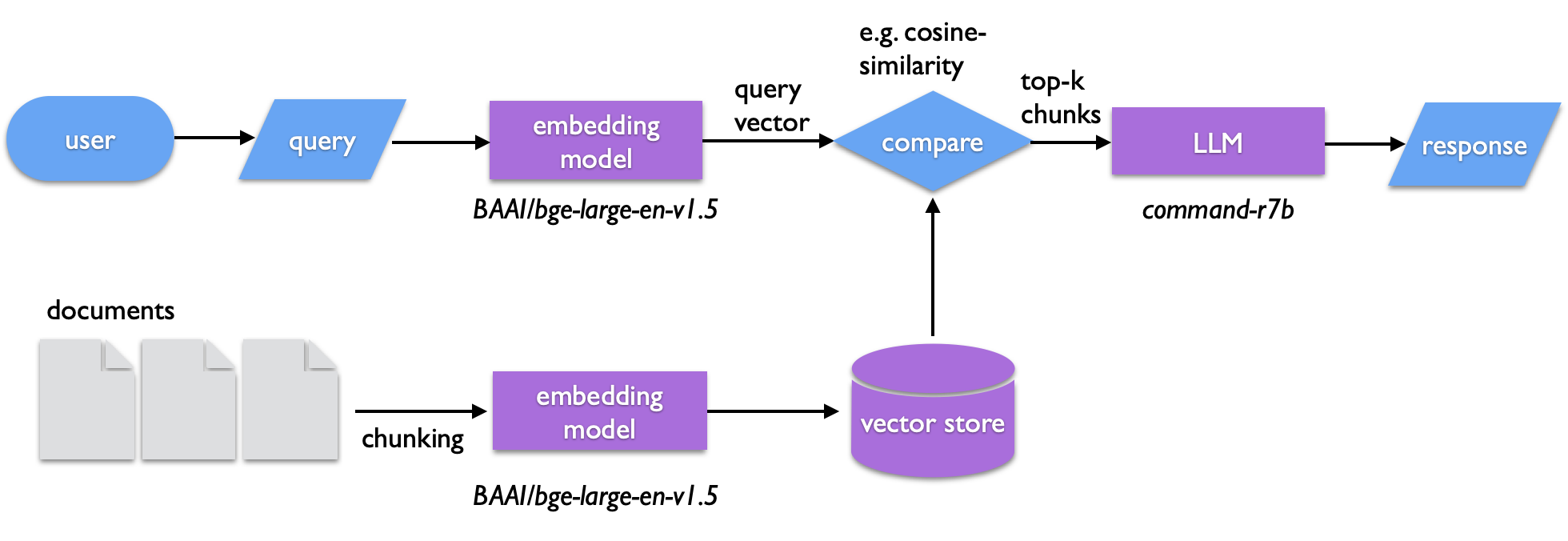
1. Setup
Prerequisites
You need:
- Python 3.10+
ollamainstalled and working (from Part II)- About 2–3 GB of disk space for models
Create a virtual environment
python3 -m venv .venv
source .venv/bin/activate
Or with uv:
uv venv .venv
source .venv/bin/activate
Install the required packages
pip install llama-index-core llama-index-readers-file \
    llama-index-llms-ollama llama-index-embeddings-huggingface \
    python-dateutil
The llama-index-* packages are components of the LlamaIndex framework, which provides the plumbing for building RAG systems. python-dateutil is used by clean_eml.py for parsing email dates.
A requirements.txt is provided:
pip install -r requirements.txt
Pull the LLM
We will use the command-r7b model, which was fine-tuned for RAG tasks:
ollama pull command-r7b
Other models work too — llama3.1:8B, deepseek-r1:8B, gemma3:1b — but command-r7b tends to follow retrieval-augmented prompts well.
Cache the embedding model
The embedding model converts text into vectors. We use BAAI/bge-large-en-v1.5, a sentence transformer hosted on Huggingface. It will download automatically on first use (~1.3 GB), but you can pre-cache it with a short Python script:
from llama_index.embeddings.huggingface import HuggingFaceEmbedding
embed_model = HuggingFaceEmbedding(
    cache_folder="./models",
    model_name="BAAI/bge-large-en-v1.5"
)
Save this as cache_model.py and run it:
python cache_model.py
(This is also saved in the Github.) Each script that uses the model will set environmental variables to prevent checking for updates. You can manually update either by running cache_model.py or editing the scripts themselves.
2. The libraries we use
A RAG system is built from three independent layers, each handled by a different library:
| Layer | Library | What it does |
|---|---|---|
| Orchestration | LlamaIndex | Glues the pieces together: chunking, indexing, retrieval, prompt assembly, response synthesis |
| Embeddings | Hugging Face (via sentence-transformers) |
Provides the model that converts text into vectors |
| Generation | Ollama | Runs the LLM that produces the final answer |
LlamaIndex used to be a single package; since version 0.10 it has been split into a small llama-index-core plus dedicated integration packages. That is why our pip install line includes several llama-index-* packages -- one for each external thing we plug in (Ollama for the LLM, Hugging Face for embeddings, file readers for local documents). If you find older tutorials online that import from llama_index (no .core), they predate the split and will not work.
The two key patterns to recognize in build.py and query.py:
1. Global Settings. Instead of passing the LLM and embedding model into every call, LlamaIndex uses a global Settings object:
Settings.llm = Ollama(model="command-r7b", request_timeout=360.0)
Settings.embed_model = HuggingFaceEmbedding(model_name="BAAI/bge-large-en-v1.5")
After these two lines, every component (index, query engine, retriever) automatically uses the configured models. This replaced the older ServiceContext pattern, which has been removed.
2. Environment variables before imports. At the top of each script:
import os
os.environ["TOKENIZERS_PARALLELISM"] = "false"
os.environ["SENTENCE_TRANSFORMERS_HOME"] = "./models"
os.environ["HF_HUB_OFFLINE"] = "1"
These must come before from llama_index... imports, because the Hugging Face libraries read the environment at import time. HF_HUB_OFFLINE=1 tells the libraries not to check the Hub for updates on every run -- without it, you will see a "sending unauthenticated requests to the HF Hub" warning and the script may slow down or stall on a poor connection. SENTENCE_TRANSFORMERS_HOME controls where embedding models are cached.
If you ever swap to a different embedding model and need a fresh download, temporarily remove HF_HUB_OFFLINE for one run or use a standalone script like cache_model.py.
3. The documents
The data/ directory contains 10 emails from the University of Delaware president's office, spanning 2012–2025 (the same set from Part II). Each is a plain text file with a subject line, date, and body text.
ls data/
In a real project, you might have PDFs, lab reports, research papers, or notes. For this exercise, the emails give us a small, manageable collection to work with.
Preparing your own documents
If you have email files (.eml format), the script clean_eml.py can convert them to plain text:
# Place .eml files in ./eml, then run:
python clean_eml.py
This extracts the subject, date, and body from each email and writes a dated .txt file to ./data.
4. Building the vector store
The script build.py does the heavy lifting:
- Loads all text files from
./data - Splits them into chunks of 500 tokens with 50 tokens of overlap
- Embeds each chunk using the
BAAI/bge-large-en-v1.5model - Saves the vector store to
./storage
python build.py
You should see progress bars as documents are parsed and embeddings are generated:
Parsing nodes: 100%|████| 10/10 [00:00<00:00, 79.53it/s]
Generating embeddings: 100%|████| 42/42 [00:05<00:00, 8.01it/s]
Index built and saved to ./storage
After this, the ./storage directory contains JSON files with the vector data, document metadata, and index information. You only need to build once — queries will load from storage.
What are chunks?
We can't embed an entire document as a single vector — it would lose too much detail. Instead, we split the text into overlapping segments. The chunk size (500 tokens) controls how much text each vector represents. The overlap (50 tokens) ensures that sentences at chunk boundaries aren't lost. The SentenceSplitter tries to break at sentence boundaries rather than mid-sentence.
Exercise 1: Look at
build.py. What would happen if you made the chunks much smaller (e.g., 100 tokens)? Much larger (e.g., 2000 tokens)? Think about the tradeoff between precision and context.
5. Querying the vector store
The script query.py loads the stored index, takes your question, and returns a response grounded in the documents:
python query.py
Enter a search topic or question (or 'exit'): Find documents about campus safety
Here's what happens behind the scenes:
- Your query is embedded into a vector using the same embedding model
- The 15 most similar chunks are retrieved (
similarity_top_k=15) - Those chunks are passed to
command-r7bviaollamaas context - The LLM generates a response based only on the retrieved context
The custom prompt in query.py instructs the model to:
- Base its response only on the provided context
- Prioritize higher-ranked (more similar) snippets
- Reference specific files and passages
- Format the output as a theme summary plus a list of matching files
Example output
Enter a search topic or question (or 'exit'): Find documents that highlight
the excellence of the university

1. **Summary Theme**
   The dominant theme across these documents is the University of Delaware's
   commitment to excellence, innovation, and community impact...

2. **Matching Files**
   2024_08_26_100859.txt - Welcome message highlighting UD's mission...
   2023_10_12_155349.txt - Affirming institutional purpose and values...
   ...

Source documents:
  2024_08_26_100859.txt  0.6623
  2023_10_12_155349.txt  0.6451
  ...

Elapsed time: 76.1 seconds
Notice the similarity scores — these are cosine similarities between the query vector and each chunk's vector. Higher is more relevant. Also note that the search is semantic: the query said "excellence" but the matching documents talk about "achievement," "mission," and "purpose." The embedding model understands meaning, not just keywords.
Exercise 2: Run the same query twice. Do you get exactly the same output? Why or why not?
6. Understanding the pieces
The embedding model
The embedding model (BAAI/bge-large-en-v1.5) maps text to a 1024-dimensional vector. Two pieces of text with similar meaning will have vectors that point in similar directions (high cosine similarity), even if they use different words. This is what makes semantic search possible.
The LLM
The LLM (command-r7b via ollama) is the generator. It reads the retrieved chunks and composes a coherent answer. Without the retrieval step, it would rely only on its training data — which knows nothing about your specific documents.
The prompt
The default LlamaIndex prompt is simple:
Context information is below.
---------------------
{context_str}
---------------------
Given the context information and not prior knowledge, answer the query.
Query: {query_str}
Answer:
Our custom prompt in query.py is more detailed — it asks for structured output and tells the model to cite sources. You can inspect and modify the prompt to change the model's behavior.
Exercise 3: Modify the prompt in
query.py. For example, ask the model to respond in the style of a news reporter, or to focus only on dates and events. How does the output change?
7. Exercises
Exercise 4: Try different embedding models. Replace
BAAI/bge-large-en-v1.5withsentence-transformers/all-mpnet-base-v2in bothbuild.pyandquery.py. Rebuild the vector store and compare the results.
Exercise 5: Change the chunk size and overlap in
build.py. Trychunk_size=200, chunk_overlap=25and thenchunk_size=1000, chunk_overlap=100. Rebuild and query. What differences do you notice?
Exercise 6: Swap the LLM. Try
llama3.2orgemma3:1binstead ofcommand-r7b. Which gives better RAG responses? Why might some models be better at following retrieval-augmented prompts?
Exercise 7: Bring your own documents. Find a collection of text files — research paper abstracts, class notes, or a downloaded text from Project Gutenberg — and build a RAG system over them. What questions can you answer that a plain LLM cannot?
Exercise 8 (optional, sets up Part IV): Build a larger corpus. Ten emails is small enough that retrieval is barely selective — the system returns most of the corpus on every query. The script
fetch_arxiv.pypulls 100 recent abstracts from a chosen arXiv category and writes one text file per abstract:python fetch_arxiv.py --category cs.LG --max 100 --output data_arxivTry other categories:
physics.chem-ph(chemical physics),cond-mat.soft(soft matter),cs.AI(artificial intelligence),cs.CL(computational linguistics),physics.flu-dyn(fluid dynamics). Then updatebuild.pyto point at your new directory (or symlink it as./data), rebuild the vector store, and query it. With a 100-document corpus, retrieval becomes meaningfully selective and the choice of embedding model matters more.Other corpora to consider:
- CCPS process safety case studies — https://www.aiche.org/ccps/resources (some are openly available as text or PDF)
- US Chemical Safety Board incident reports — https://www.csb.gov/investigations/
- NIST chemistry data sheets — https://webbook.nist.gov/
- AIChE journal abstracts — many publishers expose abstracts via their APIs
If your sources are PDFs, install
llama-index-readers-file(already inrequirements.txt) and useSimpleDirectoryReader— it picks up
Exercise 9 (optional): The embedding model
BAAI/bge-large-en-v1.5and the LLMcommand-r7bwere both released in 2024. By the time you read this, newer and likely better models exist. Find a current state-of-the-art:
- Browse the MTEB leaderboard for current top embedding models
- Browse Ollama's model library sorted by recent or popular for current LLMs
- Replace one model at a time in
build.pyandquery.py, rebuild if the embedding model changes, and compare retrieval qualityDocument the model versions and dates in your machine log. Models that "feel old" are part of the engineering reality of working with this stack — what was best last year may not be best today.
Additional resources and references
LlamaIndex
- Documentation: https://docs.llamaindex.ai/en/stable/
Models
- Ollama: https://ollama.com
- Huggingface models: https://huggingface.co/models
Models used in this tutorial
| Model | Type | Role | Source |
|---|---|---|---|
command-r7b |
LLM (RAG-optimized) | Response generation | ollama pull command-r7b |
BAAI/bge-large-en-v1.5 |
Embedding (1024-dim) | Text -> vector encoding | Huggingface (auto-downloaded) |
Other LLMs mentioned: llama3.1:8B, deepseek-r1:8B, gemma3:1b, llama3.2
Other embedding model mentioned: sentence-transformers/all-mpnet-base-v2
Further reading
- Patrick Lewis, Ethan Perez, Aleksandra Piktus, Fabio Petroni, Vladimir Karpukhin, Naman Goyal, Heinrich Küttler, Mike Lewis, Wen-tau Yih, Tim Rocktäschel, Sebastian Riedel, and Douwe Kiela. 2020. Retrieval-Augmented Generation for Knowledge-Intensive NLP Tasks. In Advances in Neural Information Processing Systems, 2020. Curran Associates, Inc., 9459–9474. https://proceedings.neurips.cc/paper_files/paper/2020/hash/6b493230205f780e1bc26945df7481e5-Abstract.html — the foundational RAG paper that introduced the retrieve-and-generate framework we use here.
- Harold Booth. 2025. Development and Implementation of the NCCoE Chatbot: A Comprehensive Report. National Institute of Standards and Technology, Gaithersburg, MD. https://doi.org/10.6028/NIST.IR.8579.ipd — practical guidance on building a RAG-based chatbot, including architecture and security considerations.
- Open WebUI (https://openwebui.com) — a turnkey local RAG interface if you want a GUI.